Azabooti
Zigbee Button Smart Wireless Remote Control Scene Switch Battery Powered Automation Scenario Switch For EWelink Devices Z2mqtt
Zigbee Button Smart Wireless Remote Control Scene Switch Battery Powered Automation Scenario Switch For EWelink Devices Z2mqtt
Couldn't load pickup availability
Free shipping on orders over $50 — Easy 30-day returns
Azabooti presents the Zigbee Button Smart Wireless Remote, a compact scene switch for hands on control of your smart home. This battery powered Zigbee 3.0 button triggers scenes and automations with a simple press.
Experience instant, hands on control of your smart home with a single touch. The Zigbee Button is a compact, battery powered wireless remote that lets you trigger scenes and automate devices without opening an app. Designed to work with your EWeLink Zigbee gateway or Zigbee 2mqtt setup, this 50 by 50 millimeter button brings smart living to the wall, the table, or anywhere you want it most—at your fingertips.
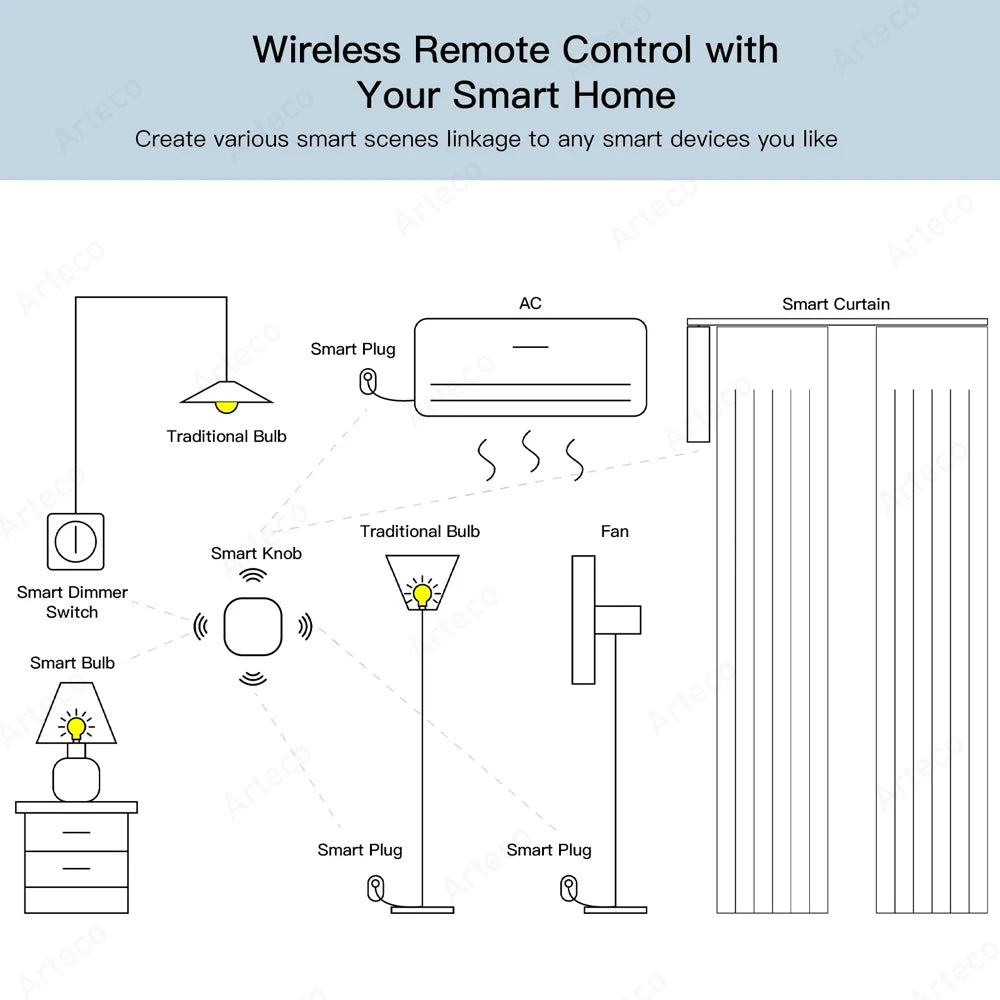
Put simply, this is a two in one wireless scene switch. You can configure one scene to activate with a single press and a second scene with a double press, so you can tailor your automation without pulling out your phone. A long press (more than 3 seconds) can be set to trigger an additional action or mode, depending on how you configure your automations in the app. It’s the quickest way to power on a Zigbee bulb, switch off devices, or run complex routines with just your finger.
Key compatibility and network notes ensure you get reliable performance. The button uses Zigbee 3.0 and is intended to work with your Zigbee gateway or hub, including EWeLink supported hubs and Zigbee 2mqtt bridges. It is not compatible with Tuya Smart Life Zigbee gateways, so you’ll want to pair it with a supported hub to ensure seamless operation across scenes and devices in your smart home. The device supports a practical open area range of up to 30 meters in ideal conditions, giving you flexibility in where you place it around the home.
Ease of installation and versatility are built in. The unit is battery powered with an included CR2032 battery, so there’s no wiring or power outlet required. It can be hung on a wall or placed on a table for quick access, making it ideal near doors, on a side table, or at the entry to a room. The button is designed for daily use and is built to withstand typical home environments, with operation temperatures from -10 °C to 55 °C and humidity tolerance up to 99% RH. It’s also IP55 rated for enhanced resilience in varied conditions, so you can use it in more places around your home or workspace.
What you get in performance terms is reliability and simplicity. The button’s small, modern profile blends with most interiors and remains unobtrusive while delivering consistent scene control. In your app, you can create multiple intelligent scenes for your EWeLink connected devices and automate routines that start when you press once, twice, or hold the button. Use cases are plentiful: turn on a hallway light and start a music scene with a single press, switch off all electronics when you leave the room with a double press, or activate a “goodnight” or “away” mode with a long press. The result is a more streamlined daily routine, reduced device clutter, and a faster pathway to your preferred smart home ambiance.
Care and usage are straightforward: keep the device at room temperature and away from direct moisture or immersion. Replace the CR2032 battery when operating life declines, and ensure the gateway or hub remains within range of the Zigbee network for optimal reliability. Regularly check your app for scene configurations and updates to maintain peak performance. This button is a smart, scalable addition to any Zigbee-based smart home that values quick physical control alongside app-based automations.


Features
- Trigger scenes with single press
- Configure double press for second scene
- Long press for additional action
- Works with EWeLink gateway and Zigbee2MQTT
- Compact wall or table mount design
- Low power consumption for long life
- Easy setup with minimal app interaction
Frequently Asked Questions
What systems does this Zigbee Button support?
It works with EWeLink Zigbee gateways and Zigbee2MQTT setups, giving broad compatibility for most Zigbee ecosystems. Setup is straightforward and momentary actions wire to scenes in your app.
How many actions can I assign to the button?
You can configure a single press for one scene, a double press for a second scene, and a long press for an additional action or mode, enabling flexible automations.
Does it affect smart bulb power or only scenes?
The button is designed to trigger automations such as powering on Zigbee bulbs or switching devices off, without needing a phone. It acts as a quick controller for routines.
Materials
Materials
Shipping & Returns
Shipping & Returns
Dimensions
Dimensions
Care Instructions
Care Instructions